
Do you have a new garage door opener or a new car that needs syncing? Or perhaps you’ve upgraded to a modern model like the LiftMaster garage door opener so you can finally connect it to your vehicle rather than use a garage door remote control. Doing so offers many benefits, such as easy convenience, while ensuring you won’t have to worry about a misplaced garage door remote ever again! Sounds like a total dream, right?
Lucky for you, Jolly Goat Garage Doors is here to help you figure out how to sync your LiftMaster garage door opener directly to your car! We’ll explain why you should sync your LiftMaster garage door opener to your car, and discuss the difference between a car’s HomeLink system and a built-in garage door opener button.
Most importantly, we’ve put together two separate guides to help you: (1) directly sync your LiftMaster garage door opener with your vehicle, and (2) connect your LiftMaster garage door opener to your vehicle’s HomeLink.
Related Article: Is There a Way to Disable the Garage Door Sensors on a LiftMaster Opener?
Ready? Let’s get into it!
Why You Should Sync Your LiftMaster Garage Door Opener to a Car
We provide LiftMaster services, so we know firsthand just how beneficial syncing your LiftMaster garage door opener to your car is. Here are some of the reasons why we think it’s great:
Easily operate your LiftMaster opener from the safety of your car.
Say goodbye to the old garage door opener remote control! You won’t need to press a remote control button; now, you can operate your garage doors from your dashboard.
The programming process is easy and straightforward.
Enjoy enhanced security—you don’t have to worry about a lost garage remote falling into the wrong hands!
A Car’s HomeLink System vs. Built-In Garage Door Opener Button

Let’s make a quick distinction between the wireless system called HomeLink and the built-in button in cars because the syncing process will be slightly different for each type.
Your HomeLink device is an integrated system typically located and integrated into the interior of a vehicle. It’s compatible with most garage door openers as well as other devices such as gates, home appliances, and security systems. It’s also incredibly versatile and customizable, as the HomeLink buttons can be programmed. Each programmed button can have a different function connected to different devices, allowing you to assign a chosen task to your desired button.
On the other hand, some cars have built-in garage door opener buttons that are typically found on the car’s dashboard or overhead console. The built-in button allows you to program your garage door with just a few clicks. While HomeLink is a separate external system that can either be a factory or aftermarket installation, these built-in garage door opener buttons have been installed during manufacturing.
Overall, be sure to follow the specific syncing process for the type of system your car has.
A Few Quick Tips

- Sync garage door openers in a secure location.
- Keep children and pets away during the syncing process.
- Consult the owner’s manual to help you understand the safety precautions and specific instructions related to the process.
- After the syncing process, test the safety features of the LiftMaster garage door openers to make sure they’re working properly.
- If you’re not confident about syncing the opener with your car, you can always have a professional program the LiftMaster opener for you. They’ll efficiently go through the programming steps, which is especially beneficial if it’s a time-sensitive matter.
How to Directly Sync Your LiftMaster Garage Door Opener With Your Vehicle
1. Locate the Learn Button on Your LiftMaster Garage Door Opener
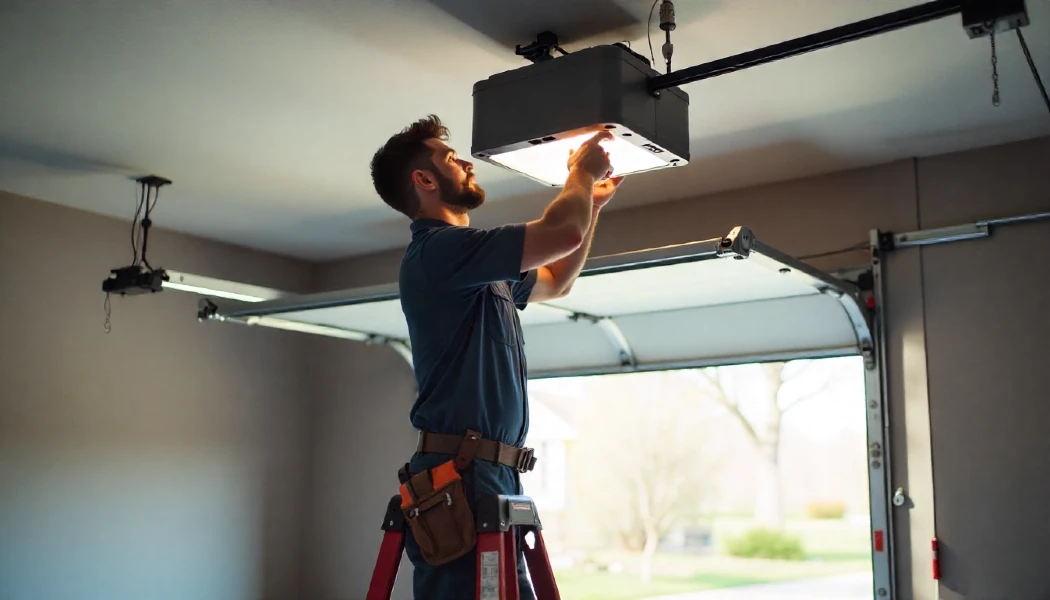
The first step is to find the “learn” button, typically located on the side or back of the garage door opener or MyQ Control Panel. You either have a LiftMaster overhead door opener or a wall-mounted garage door opener. Typically, you’ll need a ladder to reach both types. Open the unit and locate the learn button. If you can’t find it, you may need to remove the light cover and check beneath it.
2. Press the Learn Button
Afterward, quickly press and release the learn button. This button can be a green, purple, or reddish-orange square, depending on the model. When the garage door opener lights blink, it means syncing mode has been activated, allowing the unit to receive signals from your car.
3. Press Your Car’s Garage Door Opener Button
Following the previous step, go to your vehicle. Press and hold your car’s garage door opener button.
4. Sync LiftMaster Garage Door Opener to Car
Don’t release the car’s garage door opener button until you see the indicator light on the opener flash. It shouldn’t take more than a few seconds.
5. Wait for the Indicator Light
Keep an eye on the unit. Once the opener’s LED light flashes repeatedly, it means the syncing process is complete. These LED lights typically use different colors to refer to different statuses.
6. Check If the Connection Is Successful
To check if the connection is successful, try testing out the garage door opener button in your car. If the garage door is functioning correctly, it means a connection has been successfully established.
How to Connect Your LiftMaster Garage Door Opener to Your Car’s HomeLink System
1. Clear Previous Programming
Before you get started on the process of programming your garage door to your HomeLink, make sure to clear any previous programming. There are usually three buttons in HomeLink systems, so press and hold the two buttons on either end of the row. This prepares the HomeLink for new programming.
2. Find the Learn Button
Now, to program a LiftMaster garage door opener, find and press the learn button on the back or side of the unit. Hold the button until you see the LED light flash. When the lights stop, it means it’s ready to program.
4. Program the Existing LiftMaster Door Opener Remote
Get your current garage door opener remote for this step. Like other remotes, your LiftMaster remote will likely have a paper pinhole. Insert a pin into the hole to activate programming. For more detailed instructions, check the owner’s manual.
5. Connect the Garage Door Opener Remote to Your HomeLink System
Pick from the three HomeLink buttons. Once you’ve decided, press and hold your chosen HomeLink button until a light starts to flash slowly. At the same time, hold your remote near the HomeLink button and press both. Wait until the HomeLink LED light flashes rapidly.
5. Check If the Connection Is Successful
Test the connection. Press the HomeLink button and observe if the garage door functions accordingly.
Call Jolly Goat Garage Doors for Garage Door for LiftMaster Services!
At Jolly Goat Garage Doors, we know all about LiftMaster and various garage door services, for more garage opener information, visit our Garage Door Opener Information Center. Get in touch with us today for a free estimate at (405) 367-3129.